


Marketing
- 10 min read
- The Commerly team
- Leer en español
What is email marketing? Benefits, tools and how to start
A practical guide to email marketing: what it is, its benefits, the tools, strategy, segmentation, types of emails, the metrics you can trust and Gmail and Yahoo's sender rules.
- 10 min read
- Leer en español
Email marketing is using email to communicate with current and potential customers who have given you permission to contact them: newsletters, offers, useful content and automated messages. It's a direct channel you own that doesn't depend on an algorithm or on paying for every impression, and done well it helps you sell, build loyalty and keep your business front of mind.
This guide walks you through it step by step, plus what has changed: Gmail and Yahoo's sender requirements and why open rates are no longer reliable.
What is email marketing?
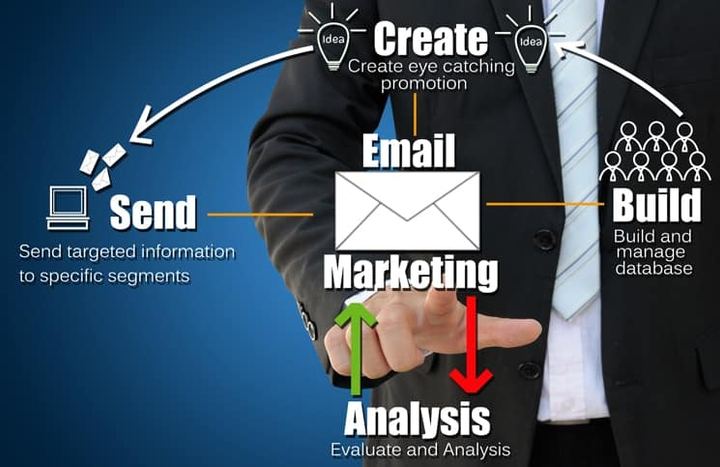
Email marketing is a form of digital marketing that uses email to send commercial messages to people who have subscribed to your list or are already your customers, directly and with no middleman.
It helps you build awareness, position yourself as an expert, sell, build customer loyalty and support moments like a purchase or a booking. In a broad sense, every email your business sends, even an order confirmation, is part of your customers' experience of your brand.
The four qualities of a good marketing email
- Valuable: useful to the reader, not just a sales pitch.
- Relevant: sent to people who care about the topic; otherwise it goes unread or gets marked as spam.
- Expected: the person signed up, knows what they'll receive and can unsubscribe easily.
- Integrated: consistent with your other channels, with landing pages that work well on a phone.
The benefits of email marketing
Lower cost than many other channels
There's no printing or postage, and you don't pay for every person who sees your message: your main costs are the platform and your time.
An audience that asked to hear from you
Your list is made up of people who agreed to receive your emails, so they're more receptive than an audience interrupted by an ad.
A channel you own
On social media, your reach depends on algorithms that keep changing and, increasingly, on paying for ads. Your list is yours: you land directly in the inbox, nearly all your customers have an email address, and a good offer is easy to forward to friends.
Targeted, personalised messages
You can use what you know about subscribers (interests, location, past purchases) to send each group what's useful to them. A franchise, for example, can email a local offer only to people who live near the store running it.
Automation
Welcome emails, reminders and post-purchase messages go out on their own at the right moment.
Sales and fast results
An email with an offer and a button straight to checkout takes a reader from interest to purchase in a few clicks, and results arrive soon after you send, which makes email ideal for time-limited offers like a 24-hour sale.
Easy to start and to measure
Platforms come with templates, and you can see who clicked and how many people bought, so you can quickly adjust what isn't working.
Email marketing tools
An email marketing platform lets you design mobile-friendly emails, manage your list, segment, automate, run A/B tests and see reports. If you're starting out, try a free plan or trial first. Some of the best-known options:
- Mailchimp: a simple editor, automations and a free plan with limits.
- Brevo (formerly Sendinblue): combines email marketing with a CRM and other channels; its free plan has a daily sending limit.
- MailerLite: a free plan that includes automations, forms and basic landing pages.
- HubSpot: connects email to its CRM, with free tools that have a monthly sending limit.
- Klaviyo: built for online stores; it connects with platforms like Shopify so you can use purchase data in your emails.
Shopify also has its own built-in email tool. Limits and prices change often, so check current terms and choose a tool that lets you authenticate your domain, segment, automate and connect with your store or CRM.
How to create an email marketing strategy
1. Set your goals
Use SMART goals (specific, measurable, achievable, relevant and time-bound). For example: grow sales from email by 15% in the next six months.
2. Define your audience
Decide who you're writing to and what they need. If you've already defined a buyer persona for your content strategy, use it as your starting point.
3. Build your list with permission
You'll always lose some subscribers, so keep adding new ones: sign-up forms on your website and social profiles, a free resource in exchange for an email address (a guide, a first-order discount), an opt-in when people buy or book, or your shop counter, always with consent.
Never buy email lists: those people haven't given you permission, they're likely to report you as spam and, in Australia, emailing them without consent can breach the Spam Act.
4. Plan your content and calendar
Decide what you'll send (newsletters, offers, vouchers, videos) and how often: email too rarely and people forget they signed up; too often and they unsubscribe.
5. Measure and optimise
Compare each send's results with your goals and adjust the subject line, content, offer or timing.
How to segment your email list
Segmenting means splitting your list into groups with something in common so each gets what interests them. Generic emails lead to unsubscribes and spam complaints, which now affect whether you reach the inbox. You can segment by:
- Demographics: age, city or country.
- Interests: topics or products chosen at sign-up.
- Behaviour: pages visited and clicks in past emails.
- Purchase history: what they bought, how much and how recently.
- Relationship with your business: new subscriber, regular customer or lapsed customer.
- Stage in the buying journey: someone just discovering your brand needs different emails from someone ready to buy.
Start with two or three simple segments. A restaurant, for example, could separate takeaway and delivery customers from people who book tables, and send each group different offers (here are more ways to promote your food business online).
Types of marketing emails
Campaign emails
One-off sends you schedule:
- Newsletters: news, tips or your best blog posts; they nurture the relationship and position you as an expert.
- Promotional emails: offers, launches and seasonal moments like Christmas, Mother's Day or end-of-financial-year sales.
- Announcements and invitations: a new product, an event or new opening hours.
Automated emails
Sent automatically when someone does something (or stops doing it):
- Welcome: introduce your brand and tell new subscribers what to expect.
- Lead magnet delivery: the guide or voucher someone requested when they signed up.
- Transactional: order, shipping or booking confirmations. They're not advertising, but they still represent your brand.
- Abandoned cart: reminds shoppers who left items in your online store that they can finish checking out.
- Lead nurturing: a series that guides a prospect until they're ready to buy, a core part of inbound marketing.
- Post-purchase and win-back: ask for a review, or re-engage customers who haven't bought in a while.
How to write an effective email
Sender name and tone
Match your tone to your audience: more casual for a young audience, more formal for, say, a healthcare business. Always send from the same sender name (yours or your business's) so people recognise you.
Subject line and preview text
The subject line largely decides whether someone opens your email. Appeal to curiosity, a problem you solve or genuine urgency, without promising anything the email doesn't deliver. Keep it short enough to read in full on a phone, go easy on capitals and exclamation marks, and back it up with preview text (the preheader shown next to the subject).
Personalisation
Using someone's name helps, but personalised content matters more: recommendations based on what they bought or what interests them. Use emojis with care: they feel friendly, but too many look unprofessional.
Body copy
Be clear and concise, and lead with the benefit, from most to least important. Three helpful formulas:
- FAB (features, advantages, benefits): introduce your product, highlight what makes it unique and show how it solves the reader's problem.
- BAB (before, after, bridge): describe the reader's problem, show it solved and present your product as the bridge.
- 4Ps (promise, picture, proof, push): promise something the reader wants, paint the picture, prove you can deliver and prompt them to act.
Call to action
Use one main button with specific text, like "Book a table" or "Shop the collection". When too many links compete, readers don't know what to do.
Design for mobile
Many subscribers will read your emails on their phone: use a single column, readable text, easy-to-tap buttons and alt text on images, and don't put your key message only inside an image. Send yourself a test before every send.
Getting into the inbox: Gmail and Yahoo requirements
Since February 2024, Gmail and Yahoo have required bulk senders to meet a set of rules, or risk their emails going to spam or being rejected. Gmail defines a bulk sender as anyone who sends close to 5,000 or more messages to personal Gmail accounts in 24 hours, and once you reach that, you're treated as one permanently. The main requirements are:
- Authenticate your domain with SPF, DKIM and DMARC. These are records in your domain's DNS: SPF lists the servers allowed to send email for your domain, DKIM signs your messages to prove they're from you, and DMARC tells receiving servers what to do with emails that fail those checks.
- Offer one-click unsubscribe in marketing emails, plus a visible unsubscribe link, and process requests within two days.
- Keep your spam rate below 0.3%, that is, the share of recipients who mark your emails as spam. Google recommends keeping it under 0.1%.
Since November 2025, Gmail has enforced these rules more strictly and can reject emails that don't comply. Microsoft has also required similar authentication from high-volume senders to Outlook.com and Hotmail since 2025. Google explains the details in its email sender guidelines.
Even if you send less, Gmail requires every sender to use at least SPF or DKIM and keep spam below 0.3%. In practice:
- Send from your own domain (for example, hello@yourbusiness.com.au), not a free account like @gmail.com.
- Set up authentication using your platform's instructions, and check that your campaigns include one-click unsubscribe.
- Monitor your spam rate with Google Postmaster Tools, a free tool from Google.
- Only email people who gave you permission.
How to measure results: the metrics that matter
Open rate: handle with care
It used to be the headline metric, but it's no longer reliable. Since 2021, Apple Mail Privacy Protection has downloaded emails' remote content in the background, including the invisible pixel that counts opens, even if the person never opens the message. Meanwhile, people who block images can read your email without an open being counted. Treat open rate as a rough trend only, and don't base A/B tests or automations on it.
Click-through rate (CTR)
The percentage of recipients who clicked at least one link, and now the most useful sign of interest. Some automated systems (bots) also generate clicks; platforms like Mailchimp let you exclude that activity from reports.
Click-to-open rate (CTOR)
Unique clicks divided by unique opens. Because it relies on opens, Apple's privacy feature distorts it too.
Conversion rate
The percentage of recipients who completed the action you wanted (buying, signing up, booking), and the best reflection of business impact. Tag your links with UTM parameters to see in Google Analytics 4 which sales come from email.
Other metrics to watch
- Cost per acquisition: what each conversion costs, adding up platform, design and team time.
- List growth: new subscribers over a period. Subscribing isn't buying, but it's a start.
- Bounce rate: emails that couldn't be delivered. A soft bounce is temporary (a full inbox, for example); a hard bounce is permanent (the address doesn't exist), so remove it.
- Unsubscribe rate: if it rises, review how often you send and how relevant your emails are.
- Spam complaint rate: Gmail and Yahoo cap it, so keep it well below 0.3%.
No single metric tells the whole story, so look at several together.
How to improve your email marketing
- Clean your list. Remove hard bounces and try to re-engage people who haven't clicked or bought in months; if they don't respond, stop emailing them.
- Vary your content. Humour, stories and emotion make your emails more enjoyable to read.
- Run A/B tests. Test one element at a time (subject line, button, send time) and pick the winner by clicks or conversions, not opens.
- Automate the basics. If you don't yet have welcome, abandoned cart and win-back emails, start there.
Email marketing and the law in Australia
Email marketing isn't spam: spam is unsolicited email that annoys the people who receive it, while email marketing goes to people who agreed to receive it and gives them something of value.
In Australia, marketing emails fall under the Spam Act 2003, which is enforced by the Australian Communications and Media Authority (ACMA). It comes down to three rules:
- Consent: only send to people who have agreed to receive your messages, for example by ticking a box on your sign-up form, and keep a record of that consent.
- Identify: make it clear who the email is from and include your contact details.
- Unsubscribe: include a working unsubscribe option in every marketing email and action requests within five working days.
Double opt-in, where people confirm their address by clicking a link, is a good way to show consent and keep fake addresses off your list. Gmail and Yahoo expect unsubscribes to be processed within two days, so faster is better. If you email people in other countries, check their rules too, and get legal advice if you're unsure about your situation.
In summary
Email marketing is still one of the most direct ways to talk to your customers. It now demands permission, authentication and honest metrics, but the basics haven't changed: send useful emails to people who want them.
If you'd like help planning campaigns, setting up automations or authenticating your domain, it's part of our digital marketing services.
Want to know what a new client really costs you?
Book a 30-minute chat. Bring your current ads and last month’s report, and we’ll tell you straight what’s working and what isn’t.


Written by the Commerly team
We set up the marketing, systems and AI assistants that take busywork off Australian teams, and write up what we learn along the way.
Get the monthly notes
One email a month: what we automated, what broke, and what we’d do differently.


